Improving student success through assessment transparency
A key factor in setting students up for success in their study is how assessments are designed, presented, and supported in the LMS. As we embark on a new semester, it is an opportune time to ask 'how can we make assessments clear to students so that they understand exactly what is being assessed and how to meet and excel at these requirements'. The following article outlines making assessments clear and accessible, as well as making them an opportunity to build assessment literacy for long term academic success.
Can assessments ever really be completely transparent?
The concept of transparency in assessment has been critically examined, with acknowledgement that criteria are never fully neutral or completely self-explanatory. There is always the potential for students to interpret assessment briefs and requirements differently from educators. However, acknowledging these limits does not diminish the value of clarity; rather, it highlights the importance of supporting transparency as an ongoing process. Through structured rubric use, exemplars, and opportunities for comparison and reflection, teaching staff can reduce unnecessary ambiguity and help students progressively develop evaluative judgement.
Simple approaches to assessment transparency in the LMS
1. Accessibility
Ensuring assessments are accessible to all students is a basic requirement of assessment transparency. To improve accessibility:
- Make assessment information easy to find. Use the Canvas Assignments page for all assessments and avoid duplicating information on other pages that can create version conflicts over time.
- Publish assessment information in an LMS page whenever possible as opposed to using PDF documents. If you must have a PDF version, make sure to include another format such as a Word document alongside it.
- Use accessible hyperlinks
- Use clear, step-by-step instructions that start with a verb, like 'Select a topic', 'Select a site from this list', 'Create a report with the following sections ...'.
2. Assessment availability/visibility
Making assessments available/visible at the beginning of the study period allows students to familiarise themselves with assessment outlines, submission requirements and rubrics well in advance of submission deadlines. By doing this, students can clarify any questions they may have and begin planning their submissions early. Early visibility of assessments also gives students a direction and focus for how to structure their notes and thinking while attending classes and undertaking any learning activities/personal study/personal reflections as the subject progresses.
3. Use rubrics for all assessments
Rubrics provide clarity for students on what is expected for a particular assessment, (the criteria) and what different levels of achievement look like. Students can use rubrics as both a tool for how to create their assessment piece, as well as a form of feedback on their work after it is marked, which can inform their future assessments.
What Rubric technology is available in the LMS?
- Rubrics can be created and attached to assignments using the native LMS rubrics tool, or FeedbackFruits, among other tools.
- LMS assignments allow you to create assessments that include an assessment brief/outline, with an attached rubric. The rubric is visible to students, and can be used during marking so that students can see exactly how they performed for each criteria. Staff can also add tailored comments directly into the rubric for individual students if desired, thereby improving the clarity and specificity of feedback for students. The LMS rubrics tool can be attached to any assignment, including LMS Quizzes and Discussions, and used for marking. Online workshops are available for LMS rubrics through Teaching and Learning Innovation.
- The FeedbackFruits tool allows the use of rubrics not only for individual assignments but also peer-review, self-assessment, and group member evaluation.
4. Peer and self-review
Where rubrics make standards and expectations more explicit for students, peer and self-review using a rubric goes a step further by allowing students to practise making judgements, compare different interpretations of quality, and see how the criteria operate across a variety of work. This moves transparency from simply knowing the rules to understanding how to implement them in their own work. Students can actively engage with assessment and criteria by applying it to their own and others’ work. Tools in the LMS such as FeedbackFruits support peer and self-review with rubrics.
5. Use exemplars
Similar to peer and self-review, exemplars can be used with rubrics to allow students to see real past examples of work and how they were evaluated by the rubric. This can further reduce ambiguity.
The Assessment Literacy Tool can be used in the LMS to create activities for students to interact with exemplar work.
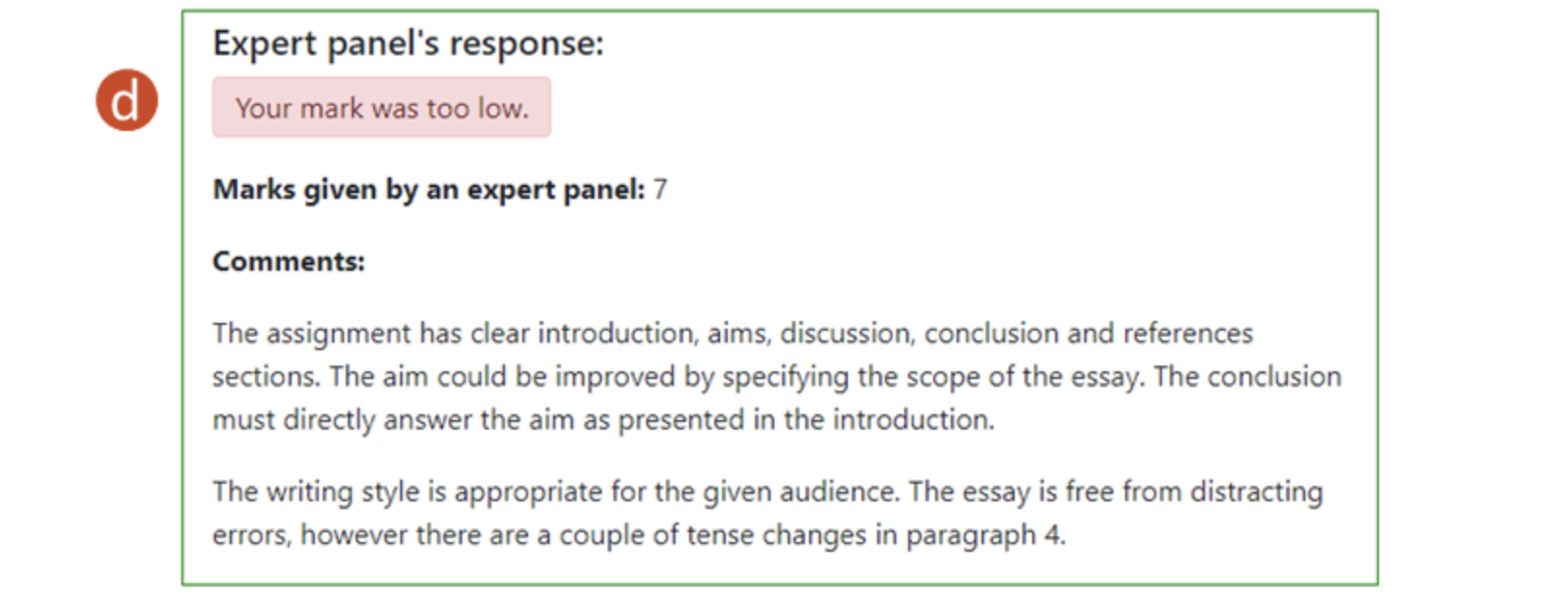
Students are presented with a sample of student work, and asked to provide a mark and feedback for each criterion set by the subject coordinator. Students are subsequently presented with expert (subject coordinator) marks and feedback for comparison.
The assessment literacy tool can be used to help familiarise students with assessment criteria for their assessment tasks or the criteria to be used in peer review activities. The image below shows one example of a use case for the assessment literacy tool.
- Students are presented with criteria provided by the teacher that they will use to assess an essay.
- The student provides a grade for the criterion based on the provided criteria description.
- The student justifies the grade awarded.
After the student submits their grade and justification, they are shown the teacher awarded grade and justification.
6. LMS Modules
LMS modules support assessment transparency by structuring information in a clear, sequenced way so students can see how learning activities, resources, and tasks connect to assessment requirements. When modules explicitly align learning outcomes, preparatory materials, and assessment criteria, they make expectations visible across the teaching period rather than only at the point of submission. This helps students understand not just what is being assessed, but how each step of the subject prepares them to meet those standards.
In summary, students improve when they can see examples of work, practise evaluating quality, reflect on feedback, and understand expectations before submission. Assessment transparency does not necessarily require a major redesign, but instead can be improved with small design choices to make expectations more visible, usable and accessible.
If you would like help with any of the ideas or tools in this article, please contact Teaching and Learning Innovation.
References
- Tai, J., Ajjawi, R., Boud, D. et al. Developing evaluative judgement: enabling students to make decisions about the quality of work. High Educ 76, 467–481 (2018)
- Karaman, P. Effects of using rubrics in self-assessment with instructor feedback on pre-service teachers’ academic performance, self-regulated learning and perceptions of self-assessment. Eur J Psychol Educ 39, 2551–2574 (2024)
- Yan, Z., Wang, X., Boud, D., & Lao, H. (2023). The effect of self-assessment on academic performance and the role of explicitness: a meta-analysis. Assessment & Evaluation in Higher Education, 48(1), 1–15