Domain spoofing: fake links, cloned pages and risky CAPTCHA checks
Scammers can imitate web addresses, email senders, and sign-in pages to look legitimate. Check the URL, use bookmarks/trusted links, and never copy, paste or run code to prove you’re a human.
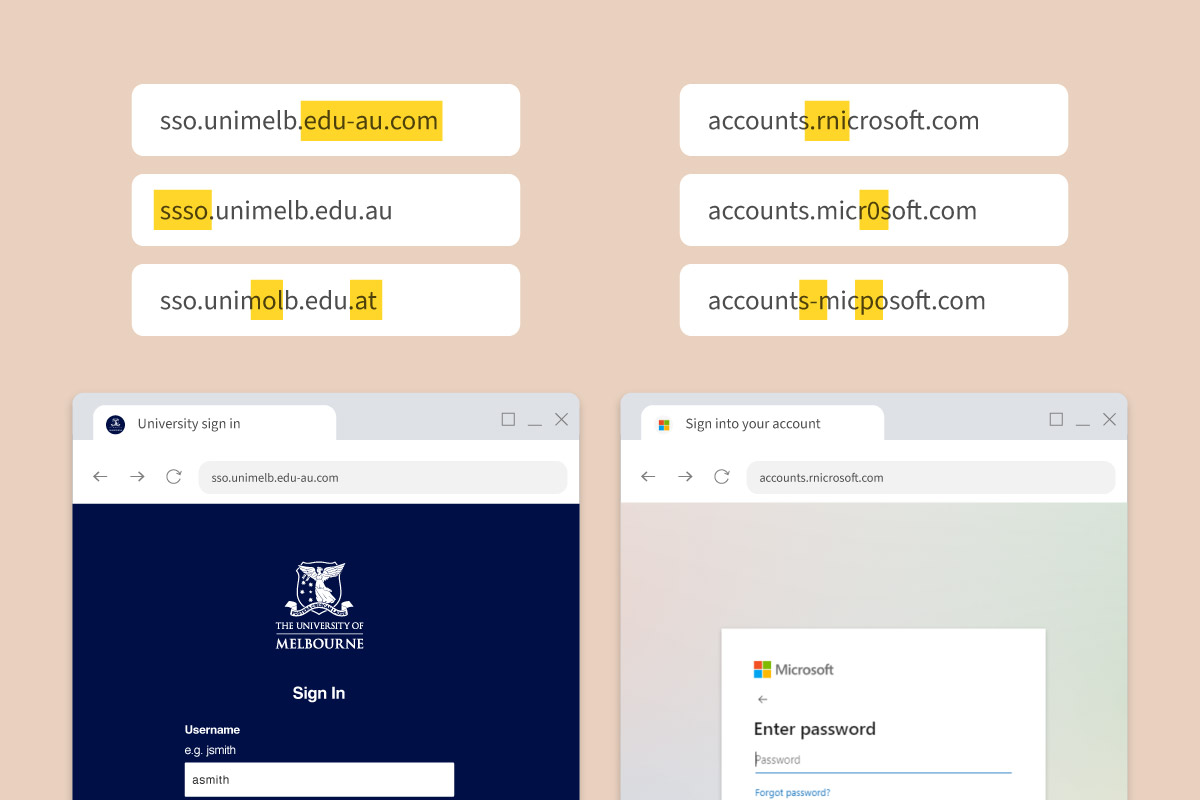
Staff and students should be on the lookout for spoofed web addresses, where attackers make web addresses, email senders or sign-in pages look like one you trust. For example, it may look just like a Microsoft login page or our very own Unimelb sign in page.
Examples:
- accounts.rncrosoft.com (where the ‘m’ is replaced with ‘r n’)
- sso.unimelb.edu-au.com (it should be .edu.au)
These spoofed web addresses (URLs) link to almost identical copies of real pages and could ask you to log in so they can steal your username and password.
Some fake pages also show a CAPTCHA-style check that we’ve posted an alert about before. Rather than asking you to click a box, they ask you to copy, paste, and run code to prove you’re a human. That code can install malicious software, steal your data, or give attackers access to University systems.
How you can stay safe
- Manually type the URL yourself, or use bookmarks
- Carefully check the URL before entering username, password or multifactor authentication details
- Never copy, paste or run code or install a file to prove you’re a human
- If you think you used your login details on one of these fake websites, or if you’ve followed some suspicious steps to prove you’re a human please report it immediately. Students should contact Stop 1, while staff should contact the Service Desk. Alternatively you can also contact the Cybersecurity team