Providing choice for students in assessment
How to incorporate choice and multimodality/multimedia in assessment.
This article will cover ways you can incorporate choice and multimodality/multimedia in assessment, and what it might mean for the way you assess and grade that work.
With increased concerns around AI use in education and attention being paid to student equity and inclusion, now is a good time to reflect on your existing assessments. There are a number of strategies you can take to increase flexibility, choice and authenticity. Increasing choice for students in their learning and assessment can support student motivation and autonomy and may have other benefits in moving away from assessments where students can easily look for a standard answer. Providing choice in assessment also supports more inclusive assessment practices, that align to the Universal Design for Learning guidelines.
Provide choice in topic or case
Providing students with a choice in topic, case or question can be a relatively simple way to increase motivation and autonomy and to do so without changing the actual assessment task or handbook information.
There is a lot of flexibility in terms of how to provide choice in topic, case or question. For example:
- Provide a set list of essay questions where students can choose the one they wish to respond to
- Provide a list of topics that students can choose from – for example, if they are expected to demonstrate they understand principles in relation to a particular topic, or present on a key topic and lead a discussion.
- Provide a range of set cases or let students find their own case study – for example, students may need to demonstrate how a particular principle or strategy relates to a case they’ve found, and how it compares to other principles or cases relevant in the industry.
Providing choice in this way works well for most assessment types, but particularly where you might be using a standard format like an essay assignment or report, or longform written component within an exam. However, it can also work for other practical assessments like group projects or presentations.
What to consider when assessing/grading
As students will have different topics or questions they are responding to, the grading criteria or rubric will need to relate to the learning outcomes and the underlying commonalities and quality you would expect across all submissions.
If students’ depth of understanding of a range of topics or principles is an expected part of the learning outcomes and needs to be supported in the assessment, this should be worked into your assessment criteria. For example, if students are choosing their own topic or case, relevant criteria might relate to:
- Ability to define and evaluate the principles of their topic/option and compare them to other topics/options, evaluate effectiveness of option compared to others
- Choosing a relevant case, reflecting on or evaluating relevance of the case or example in relation to the topic and noting limitations (e.g. limitations in context or transferability).
You may also consider whether it’s worth assessing a student’s rationale and decisions on choosing the topic/case, to demonstrate their underlying knowledge of the concepts. Even if you don’t assess these decisions, they can be useful as part of early activities to validate the student’s own work and to check they are on the right track.
You should also consider providing one or more exemplars to both students and teaching staff as a way to get them to understand the expectations of the task and what it might look like for their context. Even poor examples with an accompanying rubric can allow students to better understand the task and to self-evaluate their own work. Exemplars can be used by the teaching team as moderation samples to build consistency in marking such diverse work. If you are concerned about giving examples that students might lean on too heavily, these examples could use alternate topics that are not offered up as choice options but are still relevant as they show the underlying process and expected quality of work.
Provide choice in format/modality
Depending on the assessment and learning outcomes you would like students to meet, there may be room to allow flexibility in how students meet the task and the presentation format they choose. You could provide a set problem but allow students to demonstrate how they meet and address that problem using whichever format or presentation method they best feel demonstrates their skills and knowledge.
This option works best for assessments where you may want to encourage creativity, or level the playing field for students who struggle with more ‘academic’ formats to demonstrate their skills and knowledge. It works well for set topics where there isn’t necessarily one clear format that would be expected in the field or industry, and where creativity in approach might allow for better meeting the brief.
Example
Within the MGSE subject First Nations in Education, Dr Melitta Hogarth incorporated assessment components within the Portfolio assessments so students had choice in the output and modality of their submission. For example, students had to develop an Acknowledgement of Country but could present this as a written, audio or video piece. Other aspects of the assessments similarly allowed student choice in both topic and presentation – such as choosing from a list of set essay questions then choosing the format for how they responded to that set question. This allowed Dr Hogarth to model inclusive and culturally responsive teaching practices within the subject and support a diverse cohort of students.
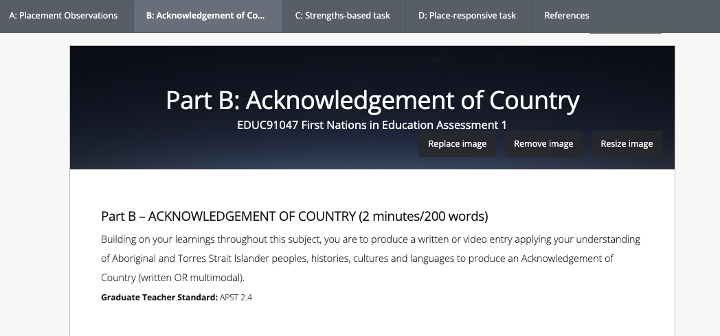
Figure 1: Acknowledgement of Country assessment in a Portfolio assessment
The teaching team have continued to allow choice through informal class and blended activities that support and work towards the assessment, such as through class Padlets where students can add their thoughts on topics using whichever modality they choose, as well as share a range of resources and different media.
What to consider when assessing/grading
When assessing, it’s important to consider what equivalence looks like across different formats, and to provide some guidelines and rough estimates around time/length and workload to students. You should also consider what an ‘evidence’ base might look like, and if this is relevant for the task. For example – if presenting a video, podcast, poster or model, incorporating in-text citations might not be relevant or fit the format/style, but could be provided as an appendix.
If you are allowing a large range of different format options, then it may also be worth incorporating a brief rationale or reflection where students can outline how they feel that the format worked for them and why they made particular stylistic decisions. For video or audio formats, consider asking students to provide a copy of their script or a transcript, as this may support later grading and review (as well as support accessibility). This can allow teaching staff to scan the script later rather than always re-watch a video.
If you are planning to assess quality of output, then it may be about using broader criteria that is less about the specific academic conventions of the format and more about the overall relevance of the format such as:
- Format choice is relevant to the task/brief
- Work makes use of the presentation method and/or conventions of the format to support understanding the topic/argument
- Work is supported with relevant evidence (either directly or indirectly)
Incorporating both process and product
Other ways to incorporate choice and multimodality while also mitigating risks around students using AI or other means in generating assessment responses, is to move away from just assessing the product (the final outcome of the work) towards assessing the process as well. It relies less on judging a fully finished output which may not have been successful, while still giving students opportunities to reflect on and demonstrate their learning from the task, which may still be relevant to the learning outcomes. This type of submission works well for larger tasks, particularly where students are expected to provide a physical or practical output (for example a project, model, research poster or a creative work) or undertake an experience (such as Work Integrated Learning). It can however be applied to other large assessments such as portfolios, case studies or reports where students might need to research and re-draft over time.
Ways that to assess process
- Students keep a blog or journal during the process and submit this along with the work. Students could use PebblePad blogs, Canvas journals/portfolios or a simple Word document submitted to an LMS assignment to track their progress. To limit increased marking load, you could ask them to nominate or only provide a set smaller number of journal entries that you will review.
- Students complete an overall reflection, exegesis, or other type of rationale as part of the assessment, submitted either with the assessment or as an additional smaller assessment after submitting their major work.
- Students attach an appendix demonstrating a timeline of the work involved and what the process was, with aspects of reflection integrated into the process documentation.
- Use LMS Canvas collaboration tools and Canvas groups to set up areas where discussions, documentation and collaboration can occur, and review and mark the evidence of this work.
What to consider when assessing/grading
If expecting students to submit evidence of the process, ensure your assessment incorporates criteria and awards marks to aspects of the process. Otherwise students will likely not spend much time or thought to the process and will document at the last minute at the end. Giving time and weight to the importance of reflection and demonstrating what reflection and documentation looks like in practice will encourage students to not only take this part of the assessment more seriously, but may increase their reflection, critical thinking and evaluative judgement skills.
Provide choice in feedback
If you are not in a position to change the assessment task, another option to consider is whether you can provide choice in how students receive feedback. For example:
- Providing both written and audio/video feedback, so students have choice in the format of feedback they receive
- Asking students to nominate the sort of feedback they are looking for, then targeting your feedback to primarily focus on those aspects (this may save you time and provide more well-received and relevant feedback)
- Incorporating a combination of self-assessment or peer review with assessor feedback. Students can thereby hear from a range of different voices and perspectives, and gain more and earlier feedback to support them in progressing their assessment.
What to consider when assessing/grading
Consider sustainable ways to incorporate more varied feedback. The LMS allows you to record a quick media comment (video feedback), upload media or a file, or use speech recognition to automatically dictate and convert verbal feedback to a text format.
For example, you could record and upload a short audio or video file such as a Zoom recording while simultaneously using the speech recognition tool to automatically dictate a text-based version. Zoom also automatically saves a transcript with recordings so is another way to generate a text-based copy of feedback at the same time as recording a video or audio file. You could then copy and paste the text into your LMS comments area.

Figure 2: Canvas feedback tools include video and audio options.
For further information, refer to How do I leave feedback comments for students in Canvas SpeedGrader?
There are a range of ways to redesign assessment to be more inclusive, while still ensuring it is valid and robust. Providing choice can be a great way to increase engagement both for students and for those marking the work. There are ways to remain sustainable from a workload perspective though it’s worth taking care to consider the purpose and clarity of your assessment and how it will be graded.
If you would like further support with making changes to your assessment, including setting up multimodal assessments using technology, or support with setting up your assessments using educational technologies, please contact Learning Environments.