SafeZone mobile app
As part of the University’s commitment to personal safety, staff, students and contractors can download a free mobile phone application called ‘SafeZone’ from Apple’s App Store or the Google Play Store.
Get the Android app Get the iPhone app
Registration
You must complete the login process in the app using your University of Melbourne credentials for University Security to receive your alerts. This service is not available to members of the public.
Find out how to set-up the SafeZone mobile app (University login required).
Key features
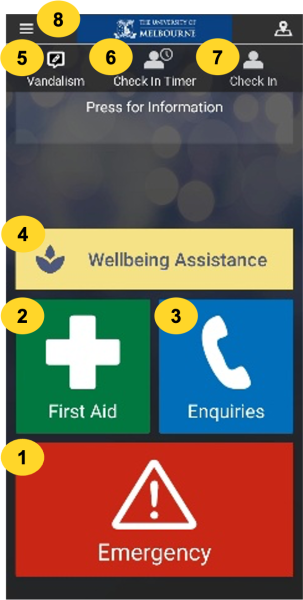
- Tap the Emergency icon in case of any emergency.
- Tap the First Aid icon if you or someone else requires urgent medical assistance.
- Tap the Enquiries icon to request University Security assistance such as a security escort, or if you are locked out of your room or lost on campus.
- Tap Wellbeing Assistance to access health and wellbeing support services.
- Report Vandalism on campus (you may submit anonymously).
- Set a Check In Timer if you are working alone or at night, enabling Security to assist if needed.
- Tap Check In to inform Security where you are on campus during an incident.
- Tap the hamburger menu icon to access more information and features, including a map of University of Melbourne areas covered by SafeZone under Regions.
More detail
-
All information you provide as a SafeZone user is protected by privacy laws and consistent with the uses set out in the University’s Privacy Policy. Only University security and emergency personnel who require access to perform their roles will have access to the data collected by SafeZone.
Personal information or incident information is not given to police. If an incident occurs and an incident report requires follow up from a criminal point of view, then the University will always seek permission from the reporting person (generally the person who activated the alert) for their details being shared with police.
-
Your location cannot be seen when you download the SafeZone app and login with your University of Melbourne credentials.
The only time your location becomes visible to Security is if you raise an Emergency or First Aid alert, set a Check In Timer or tap the Check In icon. Your location is not made visible if you tap anywhere else in the app.
When you raise an alert, your phone will provide its location to SafeZone until the alert is cancelled, whether by you or by the University. The location service uses a combination of mobile, Wi-Fi and GPS positioning. SafeZone identifies your building location, but not the indoor positioning or floor of the building.
You are not being monitored or followed. As part of the SafeZone End User Licence Agreement you agree for use of your location information by the University of Melbourne to expedite our response to your raised alert. Local emergency services can never see your location, even if you are connected directly to them.
-
You need mobile or Wi-Fi coverage to raise an alert.
When you raise an Emergency or First Aid alert via the SafeZone app, it will provide your location to Security, who will call you for more information. You can also call or message them from within the app. Security will coordinate a response and rapidly provide the most appropriate resources. Response times depend on the location and availability of responders, but assistance typically arrives within 4–6 minutes on campus.
Don’t worry if you make an accidental activation: a false activation is a good activation, as everyone is safe. After the alert has been sent, you can cancel your request, but you will still be contacted by Security to make sure that you are okay.
-
Pressing the Check In button makes your location visible to Security. It is an optional feature with safety and operational benefits including faster assistance and better coordination during incidents.
If you are working alone or late at night, we recommend that you use the Check In Timer feature to set a pre-alarm, which will activate the alarm if the timer runs down to zero. Setting a check-in timeris useful if working alone, walking through campus or to your car late at night, or when entering a hazardous or volatile environment or an internet dead zone or black spot. When you set a check-in timeryou can add a note to provide more information about your location, such as the building floor or lab you will be in. The note will be visible to Security if the alarm is activated, helping to locate you even if you are uncontactable.
-
You can use the SafeZone app at all University locations in metropolitan Melbourne and regional Victoria. You must have mobile or Wi-Fi coverage to raise an alert.
You can view the full list of locations by tapping the SafeZone hamburger menu icon at the top left of the screen, then tapping Regions. Metropolitan campuses include Burnley, Fisherman’s Bend, Hawthorn, Parkville, Southbank and Werribee, as well as affiliated hospitals and residential colleges and accommodation. Regional locations include Ballarat, Creswick, Dookie, Shepparton and Wangaratta.
If you are off-campus and send an alert, you will be prompted to call 000 by pressing a button.
-
SafeZone's use of location services has been designed to minimise battery use. Battery impact is minimal. You can set the app to run in the background (via settings) so there is no extra battery usage. If you do choose to check-in and check-out constantly, battery usage is only 1%-2% extra per hour than normal phone battery usage.
-
The University has a duty of care for our staff and students. In the event of an emergency or crisis you may receive phone/SMS alerts from University Security even if you are not registered on SafeZone. This is sent using personal information that is stored in our HR system.
Support
If you have any problems with registration or using the SafeZone app:
- Staff: contact us via IT Service Centre chat or phone (03) 8344 0888
- Students: contact Student IT or call 13 MELB (13 6352).
More information is also available on the SafeZone website.