Passkeys: A simple, secure way to log in
Passwords aren't the only option anymore. Learn how passkeys improve security, reduce phishing risks, and make signing in faster and easier.

Every day we get asked to create yet another account for a new app or website. Want to order a pizza or find the best hotel deal? Create an account.
But a new account means a new password – a password that could be stolen, guessed or leaked. Combined with multifactor authentication (MFA), strong, unique passwords are still a goated pair, but what if we told you there’s a newer, simpler and more secure way to access some of your accounts.
You might notice some websites or apps offering to replace your password with a passkey. They’re made up of two securely linked parts: a public key stored by the website or app, and a matching private key stored safely on your device, like your phone or laptop.
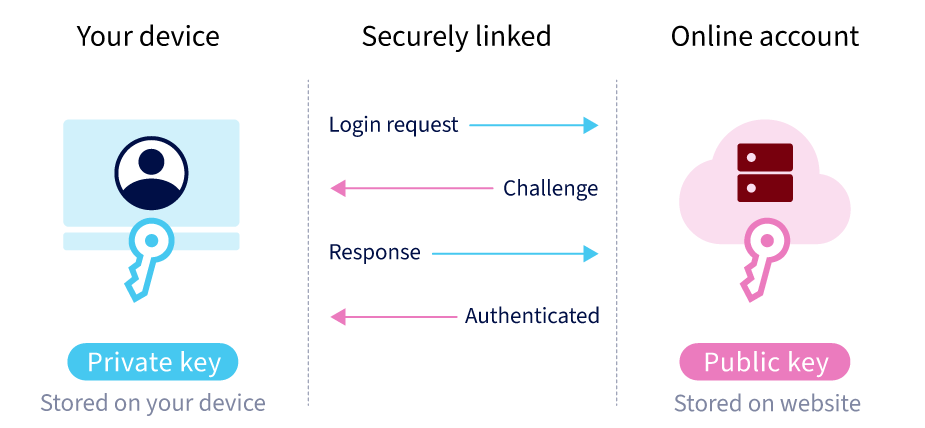
When you sign in, the website sends your device a unique challenge. Your device uses the private key to answer it to confirm it’s really you, but only after you unlock it with your fingerprint, Face ID or device PIN.
So why are passkeys better?
First, they're resistant to phishing. Because a passkey is securely linked to the real website or app it was created for, it won't work on a fake website – no matter how convincing it may look.
They're also much safer in data breaches. If a website is compromised, attackers can only get the public key, which is useless without the matching private key.
They’re convenient too! There's no need to remember complex passwords, reset forgotten credentials or enter one-time MFA codes each time you sign in.
A small tip before you start: don’t leave your passkeys stranded on one device. It’s usually better to save them in a way that makes them available across all your trusted devices, like using Apple iCloud Keychain, Google Password Manager or Windows Hello. That way, if your phone or laptop is lost, broken or replaced, you’re less likely to be locked out. You can also save passkeys to a hardware security key, like a YubiKey, if you prefer. You can also save your passkeys to a different password manager (like LastPass) but it can sometimes be a more clunky experience when trying to access them. We recommend using the built-in options listed above.
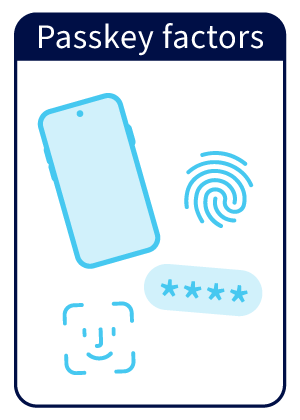 What about MFA?
Passkeys have you covered here too, combining something you have (your trusted device) with something you are or already know (like your fingerprint, Face ID or device PIN). In other words, they do the heavy MFA lifting for you!
While they’re still not available for every account, they’re becoming more common and offer one of the simplest ways to protect yourself online. For services that don’t support them yet, keep using strong, unique passwords together with MFA whenever it’s available.
So why not give them a try? You may even be using them already without noticing – especially with online banking.