Wilin Garden: Keep the Wilin Burning
Placemaking at Wilin Garden
Located at the heart of VCA Southbank, Wilin Garden was the site for the augmented reality artwork Keep the Wilin Burning, where the animated creation stories of Bunjil, Waa and Wilin came into being through the lens of your devices.
In this short doco, creative director Amina Briggs and animator Quinn Franks discuss the spiritualism and surrealism of the artwork, and the students who co-designed the work share what the artwork meant for them.
This project was supported by the SSAF Grant Program at The University of Melbourne.
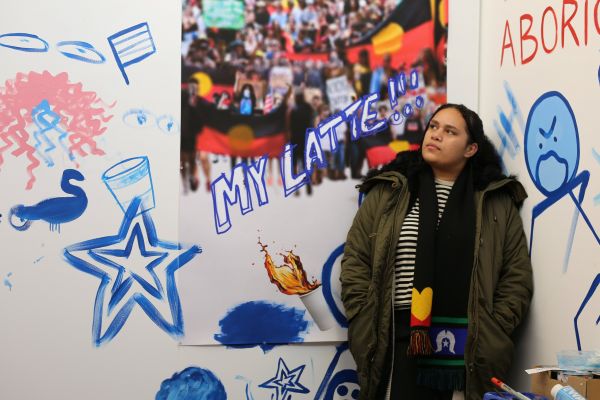 Amina Briggs, with roots in Boonwurrung, Ugar, and Erub communities, is known for her digital art and mural paintings. Her work dives into topics like identity, feminism, and racism in a straightforward and relatable manner.
Using a mix of traditional and modern styles, Briggs tackles societal issues head-on, offering a clear and contemporary take. Her art speaks volumes, highlighting her perspective on important subjects while staying grounded in her heritage and current influences.
Instagram: @amina.briggs
 Quinn Franks (they/he) is an animator based in Naarm. Experienced in 3D animation, motion capture and XR development, Quinn is interested in using new technologies for film and interactive media to develop surreal character driven work. Currently they are focused on using interactive platforms such as virtual and augmented reality as platforms for exploring character and narrative. In their own practice Quinn often employs themes of identity, isolation, unreality and interpersonal tensions through a combination of new media, bizarre imagery and unhinged characters.
Quinn completed both their Bachelor’s and Honours in Animation at the Victorian College of the Arts (University of Melbourne) from 2019 – 2022, in which their research focused on experimental approaches to 3D animation and virtual production pipelines. Quinn has exhibited their work internationally, most recently at the 2023 Ann Arbor Film Festival where they were invited as a panelist to promote in-depth explorations of animated cinema as an art form and to discuss emerging practices within 3D experimental animation.
Instagram: @proceduralgunk
About the project
-
Borne from protests in the 1990s led by First Nations students and their allies who demanded more visibility on campus, the Wilin Centre was established to uplift and support Aboriginal and Torres Strait Islander artists and academics to thrive at the University of Melbourne.
The Wilin Garden, which also takes its name from this legacy of protest, is a significant site on the VCA Southbank landscape that continues to ignite strength in community.
Tiriki Onus, Head of the Wilin Centre and the Associate Dean (Indigenous) for the Faculty of Fine Art and Music, describes why fire (Wilin) is at the heart of these places:
"As allies of the First Peoples of the Kulin Nations, this special site offers the University community an opportunity to come to Wilin Garden with a purpose and to engage with its history and stories.
The goal of this project is to help keep the Wilin burning by sharing important history and knowledge about this place, and the land we live, work and study on."
-
Initiated by Senior Video Producer Auryn Ona from the Video and Media team within Teaching and Learning Innovation, this project was first conceived as part of an augmented reality series, Campus as Canvas. The idea was to engage students, staff and the broader community with the stories of significant sites around the University by bringing them to life with student-made artworks.
In collaboration with the Wilin Centre, and with funding from the 2023 SSAF Grant Program, a project team was established to collaborate and activate this Wilin Garden augmented reality experience throughout 2023 to 2025.
-
This project was co-designed by students who helped develop it into a more immersive and accessible experience for the student body.
- A First Nations student artist was recruited via a University-wide EOI to create an artwork inspired by the Wilin Garden.
- An alumni animator was employed to create 3D models and animate the artwork.
- A paid pool of current UoM students was selected through a University-wide callout to participate in a UX/UI co-design working group. Watch the videos below to hear what a few of these students had to say about their experience.
-
Keep the Wilin Burning contributed to a significant site that ignites strength in community when artists, students and allies come together to celebrate First Nations art and the VCA landscape.
The artwork was an immersive visual experience that illustrated deep and powerful stories of this place and encouraged engagement with the cultural history of our campus.
It contributed to the ongoing development of Southbank campus by enriching cultural and social wealth and advancing reconciliation and reciprocal learning with local Indigenous peoples and communities.
-
Keep the Wilin Burning began In May 2023 using the pre-release of Geospatial Creator powered by ARCore and Google Maps Platform through Adobe Aero (beta). This technology allowed for collaboration among the project team without the need for specialist developers and coders. Unfortunately, Adobe Aero was discontinued in 2025, so the artwork is no longer supported.
At the time, these technologies allowed us to provide University of Melbourne students everything they needed to readily design and publish an interactive immersive experience site specific to their campus.
The sights and sounds of 'Keep the Wilin Burning'
-
Visit our Vimeo Project Deck to watch our short videos about Keep the Wilin Burning:
- The making of 'Keep the Wilin Burning AR' - 4:20 min
- Trailer: 'Keep the Wilin Burning' - 1:37 min
- Amina’s Story - 00:58 sec
- Quinn’s Story - 00:46 sec
- Duy’s Story - 00:30 sec
- Florence’s Story - 00:42 sec
- Celine’s Story - 00:44 sec
-
Keep the Wilin Burning was inspired by ‘Stories of place, the Wilin Garden story by Tiriki Onus’ (20.13min).
Note: Please do not use excerpts or clips from this audio without seeking permission from the Wilin Centre.
Technical specs
This AR artwork was hosted by Adobe Aero and required an iPhone or iPad, and a Safari browser. Although the artwork is no longer supported by Adobe Aero, this article is a record of how the artwork was accessed by our audiences.
-
- After you click on the button, check the top of your browser for the Adobe Aero 'Open' button.
- Allow a minute for the experience to load and tap continue when it is ready.
- This AR experience is not supported on an Android.
-
- Once your camera is working, you will be asked to find a horizontal surface - try to scan your phone over a flat surface like a table, seat or the ground.
- When the surface is found, tap your device to 'create an anchor'. Your surface will be selected and you can begin your AR experience!
-
Go ahead - tap the AR animations on your device to get them to interact with you; walk around to explore them from different angles; and don't forget to listen out for the sounds they make!
-